I will try to provide coverage on this blog for these 2 webinars taking place tomorrow. The webinar hosted by Callidus features an Accenture partner discussing the insurance industry, and the Xactly webinar features Jeff Kaplan discussing on-demand sales performance analytics. Follow the links to register.
Callidus 7/29 @ 9A CST - Best Practices from Accenture - Align producer and advisor behavior, maximize mindshare - and effectively manage compensation
https://callidussoftware.webex.com/callidussoftware/onstage/g.php?d=570992696&t=a
Learn about insurance industry best practices from Jon Walheim - Accenture Partner - North America Insurance Marketing, Sales, and Service Lead. You’ll learn about key trends in the insurance industry, challenges that organizations are facing, and what insurance leaders are doing to gain competitive advantage.
Xactly 7/29 @ noon CST - The Business Case for On-Demand Sales Performance Management Analytics
https://www1.gotomeeting.com/register/415893690
In this Webinar, Xactly’s Karen Steele and THINKStrategies’ Jeff Kaplan will discuss how post-sales analytics can provide new and strategic insight into an organization’s selling patterns, commission spend, product performance, sales rep and team performance, and sales plan effectiveness. They will examine how post-sales data – traditionally scattered across a variety of disparate systems including ERP, HR, and Payroll – can be now be integrated and analyzed with an eye towards enhancing business strategies, changing sales rep behaviors, and super-charging sales organizations.
Showing posts with label Sales Performance Management. Show all posts
Showing posts with label Sales Performance Management. Show all posts
Monday, July 28, 2008


Thursday, July 24, 2008
New web forum for the EIM Community - Get your Answers Now!
 Today I came across a web forum called "Ask Jon!" by OpenSymmetry. It's a great knowledge exchange platform where anyone can submit questions and answers.
Most posts are currently related to Callidus TrueComp, but there are new categories to discuss solutions by many other SPM vendors such as nGenera, Oracle, Practique & Merced, Sungard, Varicent, Xactly, etc.
Such forums are only as good as the content being posted, so I encourage everyone to visit and contribute in making this forum a one-stop shop for Sales Performance related information.
Of course my blog is still THE number one source of SPM information, but I may not [always] be able to answer all your questions, about every product on the market.
Don't wait, go have a look and sign-up.
Friday, July 18, 2008
Offshore Outsourcing - Humor of the Week
Here is one of my favorite Dilbert strip:

A friend also sent me this funny conversation between a consultant and an offshore resource:
Consultant: So, today is the checkpoint for the designs, status should be on 90% completed, meaning everything’s done and waiting for final review. Are you finished?
Inder: Yes, I put the status on 90% completed
Consultant: Ok, let’s have a quick look at the document. Well… the document is basically empty? How can you put it on 90% completed?
Inder: Yes, document is empty – but it’s all in my head!
In Summary:

A friend also sent me this funny conversation between a consultant and an offshore resource:
Consultant: So, today is the checkpoint for the designs, status should be on 90% completed, meaning everything’s done and waiting for final review. Are you finished?
Inder: Yes, I put the status on 90% completed
Consultant: Ok, let’s have a quick look at the document. Well… the document is basically empty? How can you put it on 90% completed?
Inder: Yes, document is empty – but it’s all in my head!
In Summary:
- The communication infrastructure in some countries can be unreliable.
- Risks associated to offshoring should be identified early.
- Expectations need to be set and communicated clearly.
Wednesday, July 16, 2008
Compensation Architect: The New Blog on the Block
 I mentioned Santorini Consulting a few times in previous posts and they just told me they had started their own blog called "Compensation Architect – Your guide to designing, implementing and managing effective compensation solutions".
So far, David Kelly, a fellow compensation management expert, is the main contributor. Sheryl Friesz, Founder and VP of Partnerships, and Brian Silverman, President and CEO of Santorini Consulting, are also planning to contribute their perspective on related topics. Each have acquired years of experience working at Callidus Software before joining Santorini.
Their 3 first posts which have been published at a frequency I hope they will be able to maintain, provide insightful information about sales compensation, policies versus procedures and the difference between reports, queries, feeds and analytics.
Hopefully, over the next few weeks we'll see some synergy between our blogs, and rather than creating redundant entries, we will each be able to provide fresh perspectives and information to our readers. Even in a field as specialized as incentive compensation, there should always be a place for blogs from product vendors, consulting companies and especially from independent guys.
Go on, take a few minutes for a visit.
Tuesday, July 15, 2008
Offshoring Sales Performance Management Implementation Components
 Based on my experience and on common sense, there are some project components which are easier to offshore than others.
Requirements and Functional Design
Early phases of a project are more challenging to offshore; these phases include the requirement gathering and the functional planning of the project. Offshoring these activities can be difficult because they require a lot of interaction with stakeholders, users and subject matter experts. This type of interaction usually works much better face-to-face than over the phone.
Technical Design, Implementation and Testing
Once the architecture of the project is established, components of the technical design, implementation and testing phases are good candidates to be offshored. Interaction with project stakeholders will obviously be necessary, but the "what" of what needs to be done should be obvious.
Sales Performance Management Implementation
There are many strategies to leverage an offshore team to implement a sales performance management application. Compensation plans can be divided between on-shore and offshore teams, or both teams can collaborate on all the plans. I prefer the collaboration approach; coordination will be a bit more complicated, but many of the risks will be mitigated. As a result, the onshore team will have a clear idea on the status of the offshore team at all time, and there will be less communication issues such as misunderstandings of the requirement and functional design documents.
Here is a list of several common SPM activities which in my experience are good candidates to be offshored. If the design documents are detailed enough, there is no reason why an offshore team could not work on everything. However, there is probably less risk in offshoring well defined activities.
- ETL: A large project will use an Extract, Transfer and Load (ETL) tool to move data where it can be used by the SPM solution. With proper access, an offshore team can make a significant contribution to this process.
- Configuration Management: An implementation is usually carried in different environments; development, various testing envionments, and production. Moving the latest files from one environment to the next can be very time consuming, and often can't be performed while a team works in the environment.
- Reference Data: Loading all the reference data including participants, titles, positions, relationships, territories, etc are activities which will not impact the building of plans, until required for testing.
- Quotas, rate tables and lookup tables: Creating and updating these objects can be a very time consuming activity.
- Formulas and rules: Sometimes, several formulas and rules which are almost identical to each other are required. Not all SPM solutions have an easy "clone" feature, making this activity very tedious.
- Processing: Also called pipeline in Callidus TrueComp, with a large number of participants and of transaction (in late testing phases), processing can take up to several hours. It can be very nice for the onshore team to work on the implementation during the day and come back the next morning to find the results ready and analysis of issues that occured.
- Testing: Testing can be a tedious job. As I discussed before, test scripts should exist which will be executed again and again... and again. Some of the first testing phases such as unit testing and system testing can be almost entirely offshored, but later phases such as integration testing and user acceptance testing are often kept onshore to be able to better monitor quality.
Note: Offshoring all the boring and repetitive activities could have negative impacts on the moral and efficiency of the offshore team, just as it would on any team.
Does anyone have other examples of SPM components which can be offshored easily?
Does anyone have other examples of SPM components which can be offshored easily?
Friday, July 11, 2008
Incentive Compensation Industry News
Callidus Software Reports Preliminary Financial Results for the Second Quarter 2008
- Subscription and support revenues for the second quarter are expected to be approximately $10.0 million, an increase of 68% over the second quarter of 2007.
- Callidus On-Demand (subscription) gross margins for the second quarter are expected to be within the range of 45 to 50%, up from 22% in Q1 2008.
WageWorks Selects Centive Compel(R) to Automate Sales Compensation Management
Centive, the leader in on-demandsolutions for sales compensation and sales performance management, todayannounced that WageWorks, the leading provider of tax-advantaged benefitsprograms, has selected Centive Compel to automate sales compensation and drivesales performance. Here is another related article.
Xactly Named World's Best New Company by 2008 International Business Awards(SM)
Xactly Corporation took home theprestigious International Stevie(R) Award in The 2008 International BusinessAwards.
Thursday, July 10, 2008
Popularity Burst
 I'm not sure what is happening to my search engine ranking on Google, but it has been climbing very quickly over the past few weeks! Here are a few examples as of this afternoon:
- Incentive Compensation: 10 (1st page!)
- Sales Performance: 17
- Enterprise Incentive Management: 20
- Incentive On-Demand: 7
- Incentive Offshoring: 2
- Incentive Compensation Implementation: 1 (woohoo!)
And that's not including all the vendor-specific keywords where I'm also ranking very well.
Thanks to everyone who kindly link to this blog. Your help in making it more visible is very appreciated. Please keep the comments, topic ideas and questions coming.
Julien
Upcoming Sales Performance Analytics Webinar, July 22nd 1pm Central
There is a very promising webinar coming up, hosted by OpenSymmetry and presented by Greg Livengood.
I particularly wanted to promote this event because I worked with Greg for several months on an Accenture project, and I know that when it comes to Sales Performance Analytics, he REALLY knows what he is talking about. Expect a very insightful presentation by a friendly, dynamic and easy-going individual who built a world-class reputation as a sales performance analytics leader and pioneer.

Event Description:
With the economy in a downward slope, sales leaders more than ever need 'Sales Performance Analytics' and efficient ways to proactively identify potential problems and opportunities.
Most companies have the information they need to improve sales performance, however, many sales managers are challenged with accessing and correctly interpreting the data.
Greg Livengood, Senior Business Analyst with Livengood Consulting Group, will discuss how to leverage the 5 best practices in sales performance analytics that can boost your sales force performance.
• Visualize Sales Performance
• Develop Corporate Alignment
• Simplicity
• Build a Self-Sufficient Solution
• Engagement at the Executive Level
Click here to register.
Tuesday, July 8, 2008
ICM Implementation Offshoring Pros and Cons
 Projects can be partially or completely outsourced. The outsourcing can be done partially or entirely offshore. The most common scenario I usually encounter is when a company outsources a project to a consulting company. The consulting team usually works on-site, and often have several resources located offshore. There seems to be a trend for consultant who used to work on-site, to be allowed to work remotely.
As I pointed out, many EIM/SPM solution vendors and consulting companies will discuss the benefits which can be achieved by outsourcing parts of an Incentive Compensation Management implementation. I agree with these benefits, but there are also many challenges which must be carefully managed to be successful.
Working with an offshore team through a consulting company reduces a lot of the risk; you don't have to worry about contracts, quality, infrastructure, intellectual properties, etc. Furthermore, consulting companies usually have a good relationship with their offshore arm.
Setting aside all ethical and macro-economics discussions about offshoring, here are some of the main pros and cons.
Main offshoring benefits:
Labor: Skilled labor can be very expensive, but it can especially be very difficult to find. Even a large consulting company may have problems finding an available consultant with the right skill set.
Cost: Offshore locations are usually developing countries where labor is significantly cheaper.
Speed: When a project is well managed, more people usually mean a more aggressive schedule.
Work 24/7: For North-American people, working with a country such as India makes it "easy" to work around the clock.
Some of the challenges to be managed
Communication and language barriers: Most of us have some experience working with team members who are located somewhere else, and have faced communication challenges related to this. Offshoring brings another layer to the communication challenges, a topic to which I will dedicate another article.
Coordination: Because of all the communication challenges, complex coordination activities become even more complex.
Cultures: Each culture have their own principles and values. Not being mindful of cultural differences can lead to big problems.
Cost: Savings could be only marginal, especially with rising labor costs in some countries (especially in India)
Quality: This is a challenge for on-site and offshore team alike. Offshore teams are usually very good at achieving very high quality standards. However, quality is still perceived as a higher risk with offshore teams.
Security: Quality is another concern most companies have, especially when dealing with confidential employment information. There are very secure mechanisms to collaborate, even across continents, but security is a topic which requires particular attention.
Key to Success
In my opinion, the key to successfully leveraging an offshore team is in:
- Having a good manager and team leads experienced with offshore projects
- Having A good [formalized] communication strategy, "hand-off" mechanism between onshore and offshore teams and processes in place
- Having a good understanding of which project components can be tackled "at night" by the offshore team and handed to the onshore team "in the morning", and vice-versa.
Wednesday, June 25, 2008
Don’t Automate Chaos
 I came across an interesting article by Roy Altman: Avoiding "Gotcha's" - Tips and Techniques that Drive Successful Implementation Projects.
Roy describes some of the common pitfalls that can undermine an HR System implementation project, including the importance of getting buy-in, of planning early, of knowing your organization, of not reinventing the wheel, etc.
There is one point which I haven't talked about on this blog so far: Don't Automate Chaos.
If your processes currently result in chaos, and you automate them, you end up with automated chaos.
That's something a lot of companies implementing EIM solutions don't always seem to understand. Many Compensation System implementations are subject to delay, budget issues or even failure because processes are not re-examined. Implementing a new large-scale system should be seen as an opportunity to redefine and improve these processes.
In a typical Customer Relationship Management (CRM) implementation such as SAP or PeopleSoft, business processes generally have to change to be in line with the application. However in the case of an EIM solution, it is easy to make the mistake to try to implement the system in the same way it is currently working... and that can result in automated chaos.
When planning your implementation, set some time aside to map out existing processes and logic to assess if/how they can be improved. Better processes should result in a higher quality implementation which will fulfills business requirements.
Monday, June 23, 2008
Stick to a Naming Convention - It's not Rocket Science!
 Wikipedia has one of the best definitions on the net for a "naming convention": A naming convention is a convention for naming things. Awesome!
In the Enterprise Incentive Management and Sales Performance Management world, this means naming all plan objects in a consistent way. Naming will vary from tool to tool and there is not a single set of best practices that can be followed. Most vendors provide some recommendations, but it's up to the implementers to decide which naming format will be used. Since there is no generally accepted "convention", it may be more accurate to call this a naming strategy.
Why is sticking to a naming strategy important:
Incentive Compensation Management is not difficult. What makes ICM systems complex is the volume of plan elements (plans, rules, formulas, tables, variables, etc..) A large implementation can quickly become a jungle if not everybody agrees on a common way of naming different objects. Not only will it make building and testing the system easier, a good naming strategy will especially be important once the original implementation team is gone and others have to understand the logic of the system. Finally, aside from clarity, a naming strategy will also help search for plan components more efficiently.
Choosing a naming strategy
As I said, since all applications do not share the same objects, and also because each application works differently, I cannot provide a silver bullet for all situations.
Generally, I try to stick to these principles:
- Make the name descriptive
- Use abbreviations to identify object type
- Begin object name with its object type abbreviation
For example, a credit rule could be called CR_AE_description. Some systems could have a direct credit rule and an indirect credit rule; in such case my abbreviation could be DC and IC instead. In some systems I may want to prefix a formula with F (if all objects can be displayed in the same view), if not, then it would not be necessary to explicitly say that a formula is a formula.
Naming of output is also important: The importance of naming an object may be obvious, but in the case of rules, the output of such rule should also be named carefully. A result name that makes sense can often by "Rule name _ result" or something similar.
Getting Started...
It is important to define a naming strategy early on in the project - before any detailed / technical design documents are created. The strategy should be illustrated on one page to enable the implementers to quickly see how to name the different objects. This "page" should be distributed to everyone involved in the implementation and be given to new joiners as well.
The first steps in defining the naming strategy is to find out if the application being used has a set of best naming practices or standards. In the case of an upgrade, it is important to stick to previously used naming strategy.
Happy Naming!Monday, June 9, 2008
Review of Centive Compel On-Demand EIM Solution
It has been a few weeks already since Sarah Carlisle, Director of Product Management and Bob Conlin, Chief Marketing Officer at Centive agreed to give me a detailed demonstration of Centive's on-demand Sales Performance Management solution called Compel.
About Centive
Let's talk about Centive for a moment: Centive has been around for a while; the company was founded in 1997 and originally focused on delivering on-premise Enterprise Incentive Management (EIM) solutions for very large companies. By 2004, Centive saw an opportunity to leverage the growing on-demand market and began developing the first on-demand sales compensation management solution – this time targeting mid-market companies. In May 2005, Centive released Compel. Shortly thereafter, they divested their original on-premise application business to ensure a focus on the on-demand market.
Compel Review
Compel is another leading on-demand EIM/SPM application with a value proposition almost identical to other applications and companies I have reviewed including Callidus, Varicent and Xactly. One nice aspect of Compel is that all its functionalities are bundled within the core application (no additional modules are required for reporting, modeling, analytics, etc.). Compel is a SAS70 Type II attested application and offers AppExchange-certified integration with SalesForce.com. Centive also has an OEM reseller agreement with ADP where Compel is sold as “ADP-ICM powered by Compel.”
Many companies like Adobe, Salary.com, McKesson, Cars.com and Sterling Commerce selected Compel to automate their sales compensation.
Compel Interface
There are 3 main "views" for Compel, each for a different type of user: the sales user view, the manager/executive view and the compensation administrator view. All views have one attribute in common: they are all very interactive. Any report or charts displayed will provide additional information when the cursor hovers over them. Clicking generally results in drilling down to get more detailed information.
Sales User
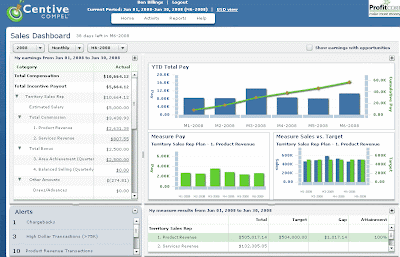
The main screen for the sales user displays at a glance all the information the salesperson needs to know. On the left portion of the dashboard they can see their total compensation, along with some details of how the total was derived. Clicking on the underlined amounts will result in showing more details.
The central portion of the screen represents in a graphical format their year-to-date total compensation, and analytics showing earnings and performance (sales vs. target) for each of their plan measures.
The bottom portion of the screen show alerts which can be either system generated or input by a business user, and more details on measure results.
About Centive
Let's talk about Centive for a moment: Centive has been around for a while; the company was founded in 1997 and originally focused on delivering on-premise Enterprise Incentive Management (EIM) solutions for very large companies. By 2004, Centive saw an opportunity to leverage the growing on-demand market and began developing the first on-demand sales compensation management solution – this time targeting mid-market companies. In May 2005, Centive released Compel. Shortly thereafter, they divested their original on-premise application business to ensure a focus on the on-demand market.
Compel Review
Compel is another leading on-demand EIM/SPM application with a value proposition almost identical to other applications and companies I have reviewed including Callidus, Varicent and Xactly. One nice aspect of Compel is that all its functionalities are bundled within the core application (no additional modules are required for reporting, modeling, analytics, etc.). Compel is a SAS70 Type II attested application and offers AppExchange-certified integration with SalesForce.com. Centive also has an OEM reseller agreement with ADP where Compel is sold as “ADP-ICM powered by Compel.”
Many companies like Adobe, Salary.com, McKesson, Cars.com and Sterling Commerce selected Compel to automate their sales compensation.
Compel Interface
There are 3 main "views" for Compel, each for a different type of user: the sales user view, the manager/executive view and the compensation administrator view. All views have one attribute in common: they are all very interactive. Any report or charts displayed will provide additional information when the cursor hovers over them. Clicking generally results in drilling down to get more detailed information.
Sales User
The main screen for the sales user displays at a glance all the information the salesperson needs to know. On the left portion of the dashboard they can see their total compensation, along with some details of how the total was derived. Clicking on the underlined amounts will result in showing more details.
The central portion of the screen represents in a graphical format their year-to-date total compensation, and analytics showing earnings and performance (sales vs. target) for each of their plan measures.
The bottom portion of the screen show alerts which can be either system generated or input by a business user, and more details on measure results.
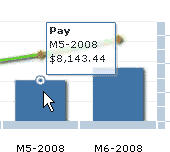
Hovering over a graph displays additional information:
Drilling down from the Incentive Payment section shows information at the transaction level:

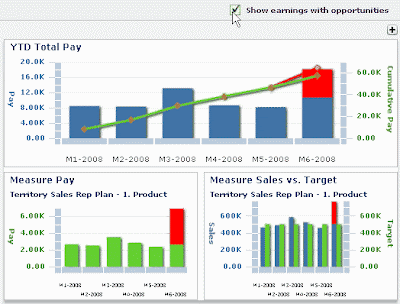
Another very interesting feature of the salesperson dashboard is the ability to display sale opportunities (from salesforce.com or other CRM/SFA systems) and the effect they have on the rep’s total compensation:
Manager View
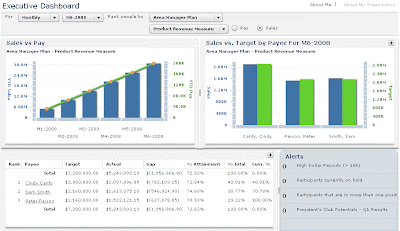
The manager view has a very similar look and feel to the salesperson view, but displays information for the entire team:
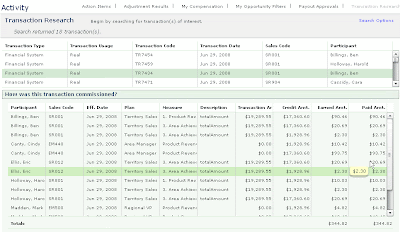
Results can also be expanded to easily find details about how a transaction was commissioned:
Comp Admin View
 The next step consists in specifying what is being measured, and defining any filters (for example, exclude sales to existing customers):
Other systems have a component approach, and maintain a component library. In Compel you build measures. You can clone measures or plans, so if you need to build a new plan it is easy to clone an existing measure and re-use it as is or modify it using the plan builder wizard
Effective Dating:
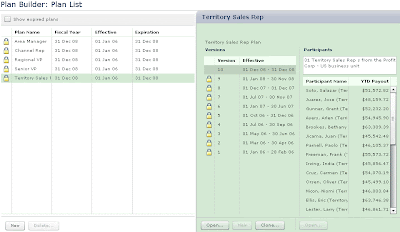
I described effective dating when reviewing the latest version of Xactly Incent and discussed how critical effective dating is in my opinion. Centive uses effective dating for everything: people records, quotas, measures, plans, transactions, results, reports, etc . which makes its maintenance much easier. It also solves the difficult problem of handling prior period adjustments – Compel recognizes the crediting rules, roll-ups and structures that were in place at the time of the original transaction, and trues-up the adjustment to the current period.
The following plan builder screen capture shows how each plan uses effective dating:
Conclusion
I would probably need to work with Compel to make-up my mind about if I like the concept of how plans are built, since it is so different from the other applications I have seen. It's very exciting to see a different way of thinking.
What I can say is that configuring a plan seems to be a very user-friendly step-by-step task. The user interfaces for sales people and managers are also very clean and display all the required information at a sight. Compel also seems to offer all the functionalities anyone could be looking for, and does so without the need to purchase additional modules.
Comp Admin View
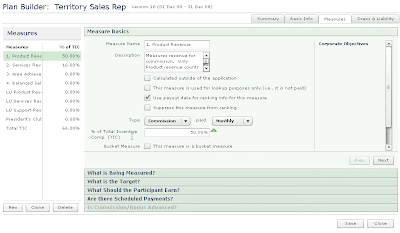
This is where plans are created and configured.. Unlike other systems I have worked with, Compel abstracts the process of creating calculation and crediting rules through their Plan Builder wizard. Plans are created by defining and grouping the "Measures"by which reps will be compensated. First, the measure name, description, period, and type of measure is specified.
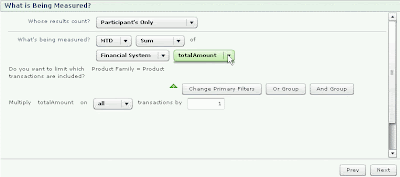
The next step consists in specifying what is being measured, and defining any filters (for example, exclude sales to existing customers): The administrator just needs to choose the appropriate option and click on "Next" to the next configuration window.
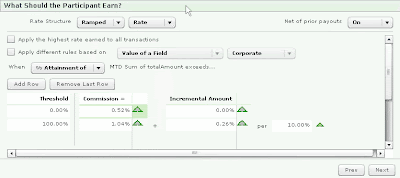
Other systems have a component approach, and maintain a component library. In Compel you build measures. You can clone measures or plans, so if you need to build a new plan it is easy to clone an existing measure and re-use it as is or modify it using the plan builder wizard
Effective Dating:
I described effective dating when reviewing the latest version of Xactly Incent and discussed how critical effective dating is in my opinion. Centive uses effective dating for everything: people records, quotas, measures, plans, transactions, results, reports, etc . which makes its maintenance much easier. It also solves the difficult problem of handling prior period adjustments – Compel recognizes the crediting rules, roll-ups and structures that were in place at the time of the original transaction, and trues-up the adjustment to the current period.
The following plan builder screen capture shows how each plan uses effective dating:
Conclusion
I would probably need to work with Compel to make-up my mind about if I like the concept of how plans are built, since it is so different from the other applications I have seen. It's very exciting to see a different way of thinking.
What I can say is that configuring a plan seems to be a very user-friendly step-by-step task. The user interfaces for sales people and managers are also very clean and display all the required information at a sight. Compel also seems to offer all the functionalities anyone could be looking for, and does so without the need to purchase additional modules.
Sunday, June 8, 2008
The Moral to the ICM Saga
 Read Part 1 and Part 2 of this story first.
The blame cannot be put on one person. ABC Corp, the ICM vendor and the consultant all own some of the responsibility for the issue.
The entire situation could have been avoided if the requirements had been better designed. Requirements could have been better designed if the compensation plans had been completed with enough details. The vendor would probably have done a better job at scoping out the work initially or in certain situations may even have not submitted a proposal.
What can we take away from this story?
- Requirements cannot be fully defined unless the compensation plans are finalized. Requirements may be inaccurate or incomplete unless compensation plans show sufficient details and examples.
- An ICM solution cannot be selected unless the requirements are fully defined.
- Not all ICM solutions can handle very complex compensation plans (no matter what the vendor's rep says). Some solutions are better suited for certain situations.
- Good requirements are the foundation for any IT project, mess up the requirements and the entire project will be shaky.
- Using an experienced consultant to help out with the requirements design, RFP writing and solution selection could be a good idea to select the ideal solution.
- Consultants and vendors alike cannot "always" guess client's intentions.
- Mentioning or emailing a requirement is not enough, this requirement must find its way to the requirement document to ensure it is met by the implementation and properly tested.
Thursday, June 5, 2008
The ICM Saga Continues...
It's Thursday; meeting time. The vendor explains the requirements from the RFP did not accurately reflect what needed to be performed by the ICM solution. "Because the scope of the project did not include all this additional work, it will cost more and take more time to complete", says the vendor calmly. "But your sales rep said it would not be a problem!", exclaims the comp director of ABC Corp. "We specifically asked about this during the presentation and your rep said it you could do it!".
 The vendor finally agrees that because the relationship between their companies is valuable and because of their strong work ethics, they will honor the agreed cost and do everything they can to meet the deadlines.
However, problems keep piling up. The ICM solution is not intended to perform what would be required for the compensation plans to work how they are supposed to work. Data integration, workarounds and clever tweaking pushes the ICM solution to its limit. The client is asked to only include what is absolutely necessary in this release and push out the rest. The deadline is missed. The solution is finally implemented, but User Acceptance Testing keeps revealing new issues. The second pay-roll date is approaching but there is still no solution in sight.

 The vendor finally agrees that because the relationship between their companies is valuable and because of their strong work ethics, they will honor the agreed cost and do everything they can to meet the deadlines.
However, problems keep piling up. The ICM solution is not intended to perform what would be required for the compensation plans to work how they are supposed to work. Data integration, workarounds and clever tweaking pushes the ICM solution to its limit. The client is asked to only include what is absolutely necessary in this release and push out the rest. The deadline is missed. The solution is finally implemented, but User Acceptance Testing keeps revealing new issues. The second pay-roll date is approaching but there is still no solution in sight.

Does this sound like a familiar situation?
Who should be blamed?
The vendor's implementation team for not working harder, their sales rep for having mis-represented their solution or not asked for more detailed requirements, or the ICM solution for not being powerful enough? ABC Corp's team or their consultant for not having defined the requirements properly?
Tuesday, June 3, 2008
The Saga of Purchasing an ICM System
ABC Corp hired a consultant with extensive Incentive Compensation Management (ICM) experience to scope the requirements to be included in the Request for Proposal (RFP) for the purchase of a new ICM solution. The consultant diligently researched the latest industry trends, ICM best practices, client needs and leveraged his experience to create an outstanding requirement document. Weeks later the RFP is born, after having spent countless hours being sent back and forth between the sales, finance, contract and legal departments.
The RFP is finally posted and it takes a few more weeks before all the proposals are in. The consultant is called again to help out evaluating the best proposal. A few solutions are short-listed, and vendors are called in to demonstrate their product. The vendor's sales reps all claim their solution is the only end-to-end ICM solution, that it is the "best-of-breed", and that it has the best analytics and reporting capabilities. 

After thoughtful consideration, a solution is chosen. It was a hard decision, but everyone at ABC Corp are happy that this long procurement process is finally over. ABC Corp's management is particularly happy that according to the timelines illustrated in the selected proposal, the solution will be in place to process this quarter's commissions and bonuses. After all, this was one of the major criteria in the evaluation process.
A kick-off meeting between the vendor's implementation team and ABC Corp's employees is scheduled. The vendor requests to see all the existing documentation about the plans to be implemented including the requirements document, to start working on the functional design documents and solution architecture. The next meeting is scheduled for Thursday.
Friday, May 30, 2008
Xactly Incent 4.0 - Effective Dating and Other New Features

Xactly will be releasing the new version of its On-Demand Sales Compensation Management application in the next week or two.
The main changes in Incent 4.0 will include an improved user interface and reports, "effective dating", improved organizational management and advanced searches.
User Interface and Reports:
The interface looks good and most of the changes were made around the new functionalities for effective dating. The reports look prettier and also have new security/privacy features. More reports are available and they work "out-of-the-box". As far as I know these reports are still not very customizable, so it will be important to make sure they satisfy the reporting needs.
Effective dating:
This is a feature I described earlier when discussing versioning. Effective dating allows to give a certain value to an object between certain dates, and a different value between other dates. This can be used to track changes to teams and reporting releationships, job or role changes, promotions, name changes, targets, etc.
For example, if a person's salary goes up from $50,000 to $60,000 on March 31st, the original version will show a salary of $50,000 and a new version will be created with an effective date of March 31st and a salary of $60,000.
Effective dating is extremely useful because rather than scrambling to make changes before a payroll date, changes can be done at anytime. Since these changes can be tracked, effective dating also improves auditability (it is easy to see how historical commissions were calculated).
Note: Effective dating in Xactly is currently limited to people, positions, hierarchy and relationships. Hopefully a future version of Incent will allow effective dating of other objects such as plans, rules, quotas, etc.
Organizational Management:
Without effective dating, organizational management was a bit tricky in previous versions. Changes in hierarchy and relationships are now much simpler and much cleaner.
Advanced Search:
Advanced searching makes the process of finding the right object or result much quicker. It was also a needed add-on to be able to search for effective dated objects.
I have seen a few minor upgrades of Xactly (3.x) and with the scope of these changes, this new release (version 4) clearly deserves it's own number. Lets just hope that effective dating will be applicable to all objects in the near future.
Thursday, May 22, 2008
SPM Testing Template - Part 5
Incentive Compensation Management test results can be recorded in several ways. One of the approach I like to use groups all plan names, rule names, conditions, expected results and testing status on the same spreadsheet. I find that by keeping all this information together, it is easier to quickly get the picture of the overall testing progress. It also allows to keep all the information on the same spreadsheet instead of having to maintain 2 spreadsheets with identical information.
Here is an example to get started:
Other benefits of using an Excel spreadsheet to record test results instead of a Word document include:
Here is an example to get started:

Other benefits of using an Excel spreadsheet to record test results instead of a Word document include:
- Ability to quickly highlight failing tests in red
- Ability to filter information displayed (e.g. display only failing tests)
- Test results can be printed on fewer pages
- Ability to create macros to perform more "fancy" features such as displaying the number of days a certain issue has been opened.
Monday, May 19, 2008
ICM Testing - Reviewing Results - Part 4
When test scenarios for an SPM application are defined properly, reviewing the results should be straightforward. However because of the volume of results typically generated, finding the correct result can be a very time consuming process without the proper skills (finding output of rule A in the 1 million results generated can be like looking for a needle in a hay stack, except that during testing, there are several needles that need to be found!).
Every ICM application I have implemented offer an interface to browse through the results. This is usually a GREAT tool to troubleshoot and to resolve issues, but it's rarely the best and quickest tool to analyze results in bulk. Fortunately, every ICM application I have seen also have a functionality to export the results. Exporting the results will create a file locally which can then be opened by a program such as Excel or Access for further analysis. I will discuss how to use Excel to review the results, and later I will create another quick tutorial on using Access.
Step 1) Export the Results from your ICM System
Every system has its own way of doing this, but generally this should be doable from the interface and not requiring a database administrator to pull the data from the database (although this can also be done if required).
Step 2) Import the Data in Excel
First, open Excel and click on File->Open. Click on the dropdown menu beside "Files of type" and click on "All Files".
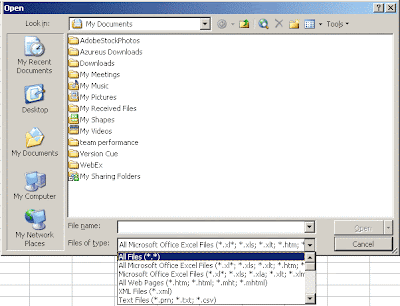 Find the location where you saved the exported file of step 1 and click on "Open".
If the file is a .CSV file, Excel will automatically place the data in columns. If the file is a .TXT file, more steps are required (see step 3).
Step 3: Opening a Delimited Text File in Excel
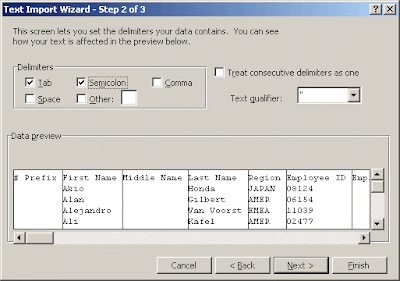
In the first Wizard step, choose "Delimited" and click on "Next". In Step 2, select the character used to delimit each column (Xactly uses semi-colons). Click "Next" twice and the data will be imported in columns.
Step 4: Filtering the Result Data
At this point we have a worksheet with all of our result set displayed. Each of the column can be sorted and the search feature can be used to quickly find a specific order. However there is another trick which allows to quickly display data for a specific rule, result name, person, date, etc.
Click on Date->Filter->AutoFilter
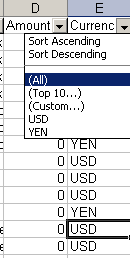
This will make the first row (usually column names) dropdown menus which will contain all the values contained within the column. In the example below, the drop-down for column "Currency" allows to choose "USD" and "YEN". Choosing USD will filter out all the other currency types.
Every ICM application I have implemented offer an interface to browse through the results. This is usually a GREAT tool to troubleshoot and to resolve issues, but it's rarely the best and quickest tool to analyze results in bulk. Fortunately, every ICM application I have seen also have a functionality to export the results. Exporting the results will create a file locally which can then be opened by a program such as Excel or Access for further analysis. I will discuss how to use Excel to review the results, and later I will create another quick tutorial on using Access.
Step 1) Export the Results from your ICM System
Every system has its own way of doing this, but generally this should be doable from the interface and not requiring a database administrator to pull the data from the database (although this can also be done if required).
Step 2) Import the Data in Excel
First, open Excel and click on File->Open. Click on the dropdown menu beside "Files of type" and click on "All Files".
Find the location where you saved the exported file of step 1 and click on "Open".If the file is a .CSV file, Excel will automatically place the data in columns. If the file is a .TXT file, more steps are required (see step 3).
Step 3: Opening a Delimited Text File in Excel
In the first Wizard step, choose "Delimited" and click on "Next". In Step 2, select the character used to delimit each column (Xactly uses semi-colons). Click "Next" twice and the data will be imported in columns.
Step 4: Filtering the Result Data
At this point we have a worksheet with all of our result set displayed. Each of the column can be sorted and the search feature can be used to quickly find a specific order. However there is another trick which allows to quickly display data for a specific rule, result name, person, date, etc.
Click on Date->Filter->AutoFilter
This will make the first row (usually column names) dropdown menus which will contain all the values contained within the column. In the example below, the drop-down for column "Currency" allows to choose "USD" and "YEN". Choosing USD will filter out all the other currency types.
Filtering can be done in this manner for multiple columns at the same time. For example you could filter a certain position (Julien Dionne), and further filter to display only the USD currency.
Quick Summation
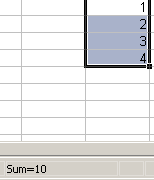
Summing credit and commission amounts is one of the most frequent activity I perform when testing.
Excel has a built in feature which allows to quickly find out the sum of selected cells. By simply highlighting the cells containing a number or a dollar amount, the total value of these cells will be displayed in the bottom-right corner of the window.
Additional Notes
Excel offers more advanced functionalities such as Pivot Tables. They can be useful when reviewing a large volume of results. I will discuss this in more details in the future.
Excel Limitations
Excel cannot have more than 65536 rows. If the result set exceeds this, it will not get imported. It is possible to "workaround" this issue by only importing a subset of data (maybe by restricting the incentive period). MS Access could also be used instead of Excel and would not be subject to this limit. I will discuss using Access to review results in the near future.
Thursday, May 15, 2008
ICM Test Planning, Scenarios and Templates - Part 3
 In my last post about testing I said that ICM / SPM systems should be tested in phases; the reason for this is that discovering issues late in the development life-cycle could add unexpected delays and ultimately make the budget run over-budget.
It is surprising how often I have seen the business users and stakeholders not agree with the results and the development team exclaim, "Oh, that's how it's supposed to work!" or "That's what you meant!". Without proper planning, it is possible that during UAT the users will try to perform various activities and "break" the system - to which the development team usually answers "You're not supposed to do that", or "That's not how it's supposed to work". Often, shortly before the payroll date, business users often ask questions such as "What about the draws?" or "What if orders have negative amounts" (good requirement documentation is also important!). Proper planning should eliminate all those nasty surprises.
There is an excellent article on Wikipedia regarding creating a test plan based on the IEEE 829 format. The test plan describes what will be tested, how it will be tested, what will be the deliverables, who will be responsible for what, etc.
Creating Test Scenarios for a Sales Performance Management System
I believe the most important aspect of testing is the test scenario preparation. I briefly mentioned how creating good test scenarios was particularly difficult with an ICM application because of the volume of test cases it will typically generate. This is unavoidable, but proper planning is required to ensure that tests are not testing the same conditions twice (wasting time) and that all conditions are being tested (not cutting corners).
A test scenario should have a name, a scenario ID and a description. This will help quickly refer to them during meetings. The test scenario should include the initial conditions, input (such as the order type), and the outcome or expected results. Finally, it is a good practice to list the business requirement ID that the scenario is testing. It is important for the test scenarios cover each plan, each rule, and each formula used within the rules. To test an ICM system, I like to group the scenarios, by Plan and by Rule:
1. Plan A
1.1 Rule A
1.1.1 Scenario 1
1.1.2 Scenario 2
1.1.3 Scenario 3
1.2 Rule B
...Creating Test Data
The test data is the data that will be "staged" to test the scenarios. Typically, an order or a combination of orders will be required to test different scenarios. These orders should be created in the appropriate format to be staged and it should be documented which orders test which scenarios. Because of the different testing phases and because test data is often altered or corrupted during testing, it is important for the test data files to be kept together and be readily available to be re-staged when required.
After processing all the test data, all the test scenarios should be tested. That should cover the entire system, and in theory, after completing these steps, the system should have no outstanding defect.
Tuesday, May 13, 2008
Common Pitfalls in Sales Compensation Design
 Today I attended the "Common Pitfalls in Sales Compensation Design" webinar, hosted by Makana Solutions, featuring guest speaker Donya Rose, Founding Partner of the Cygnal Group, a sales compensation consulting company.
I did not manage to get the audio working (the toll-free number was only for Americans and the International number was out-of-service). However I will quickly recap the major pitfalls identified, based on the presentation deck.
Pitfall 1: Sales Credit Wars
Symptom: Time is spent fighting over who is supposed to get credit
Cause: Lack of documentation, rules not formalized
Cost: Lost sales, management distraction, potentially double crediting, morale issues
Solution: Document the policies and credit-sharing criteria
My comment: Another cost which must be considered is the waste of time for the comp team trying to resolve issues and conflicts. In large organizations this can be a huge time burden. However it is generally fairly easy to minimize this situation by having well established rules.
Pitfall 2: Too many Measures
Symptom: Sales people ignore some of the required results and only focus on what makes them earn the biggest commission
Cause: Too many measures...
Cost: Lack of focus, compensation hard relate to actual results
Solution: Only use a few measures.
My Comment: This is a topic I addressed a few times on this blog. Consultants generally agree that there should be no more than 3 independent measures.
Pitfall 3: Commissions Rates only go up
Symptom: Sales people can earn too much money compared to the value they bring
Cause: Commission rates are related to the level of sales even if those sales are attributable to windfalls.
Cost: Comp cost is not in line with sales contribution
Solution: The commission rate should diminish passed a certain performance level
My Comment: A "regressive" commission can protect against an unexpected windfall, but can also avoid an excessive payout caused by a quota set too low.
I often see different rules, formulas and quotas used for orders exceeding a certain mount to avoid a windfall scenario.
Pitfall 4: Extraordinary Performance is Over-Rewarded
Symptom: Dependence on over-achiever sales people
Cause: Over-performance is too attractive to sales people
Cost: Sales people developed entitlement and demanding attitude, more risks
Solution: Use appropriate deceleration in commission rates
My Comment: Deceleration does not necessarily needs to be applied as soon as the initial target is reached. I have often seen cases where the rate increased once the target was reached, and decelerated after another performance level was attained.
Pitfall 5: Unattainable Goals
Symptom: Sales people give-up because goals are too high
Cause: Goal setting issue
Cost: Lack of motivation and engagement, results below expectations
Solution: Set goals appropriately
My Comment: Goal setting should be based on historical data if possible to be "just right". Making goals too easy to attain can lead to other problems such as a lack of motivation to exceed goals if rate decreases after, or an excessive commission payout.
Pitfall 6: "Phantom Base"
Symptom: Sales People whose salary largely depends on commissions act like they are salaried and under-achieve.
Cause: Compensation plans that pay too much for prior-year sales
Cost: Sub-optimal level of performance, losing account acquisition and penetration skills
Solution: Pay more for new business and less for prior-year sales
Pitfall 7: First Dollar Commission + Base
Symptom: Sales people are too comfortable with below-target earnings
Cause: Sales people are paid a significant base salary and earn commission on sales from first dollar
Cost: Income+Commission too high for actual productivity
Solution: Only pay commission after a threshold level of sales is achieved
My Comment: Other alternatives are possible to fix this situation. The entire compensation mix could be re-evaluated and the base salary could be lowered. It would also be possible to adjust the commission rate before a threshold to minimize the impact of removing commission completely before a certain threshold.
Subscribe to:
Posts (Atom)
Subscribe


Blog Directories


Companies Linking to Me


About Me

- Julien Dionne
- Ottawa, Ontario, Canada
- Julien Dionne is a well-rounded consultant with global business management experience and outstanding technical, business and leadership skills. He earned a Bachelor of Applied Science in Software Engineering from the University of Ottawa, Canada, and he is a member of the Canadian Professional Sales Association. The views posted within this blog do not reflect the views of Julien’s current or previous employers and clients. Julien can be reached at julien.dionne@gmail.com


